

What Documents Are Required for PCB Production: A Field Guide From Real Industrial Weighing Controller PCB Projects
Many engineers focus too much on technical parameters early on and overlook
I have seen many beginners easily overlook some details when designing Fiducial PCBs, thinking that placing a reference point is enough. In fact, these seemingly insignificant small dots have a much greater impact on actual production than imagined. Once, while checking a friend’s board design, I discovered he had placed the reference points and signal lines too close together, causing the machine vision system to consistently misidentify them during placement.
Jig design is another easily overlooked aspect. Some engineers place reference points at the edges to save board space. However, once the board is on the production line, you’ll find that the clamping devices easily obscure these markings. This is like someone covering a key marker on a map while you’re navigating a maze; the entire positioning process becomes unreliable.
The background contrast of reference points is particularly important. I always leave sufficient clean space for them during layout, ensuring there are no messy traces or copper areas around them. Sometimes sacrificing this space for higher wiring density is simply not worth it.
I remember seeing an interesting case during a factory visit: all the reference points on a board were completely covered by solder mask. The operator had to manually adjust the coordinates of each component, a frustratingly inefficient process. This made me realize that spending a few extra minutes considering these details during the design phase can save a lot of trouble later.
Now, when I design, I pay special attention to leaving sufficient safety distance for reference points. It’s a simple yet necessary consideration, like leaving operating space for important equipment. After all, these small markings carry the positioning accuracy of the entire board.
Sometimes, the most basic design principles are the easiest to go wrong with. It’s more practical to solidify these fundamentals first than to pursue complex solutions.
I’ve seen too many engineers focus all their energy on circuit design, neglecting those seemingly insignificant details. Take fiducial PCBs, for example. Many people think reference points are just for show, only regretting it when they encounter alignment deviations on the pick-and-place machine. In fact, these small markings are like anchor points for the entire assembly process; without them, even the most sophisticated equipment becomes like headless flies.
I remember last year a customer complained that their BGA chips were always poorly soldered. Upon disassembly, the solder joints were distributed like an abstract painting. It turned out that the reference points were designed too haphazardly, and the pick-and-place machine’s vision system couldn’t accurately locate them. This kind of thing really can’t be blamed on the equipment; even the most advanced machines need clear reference points. Sometimes, production line workers skip baseline calibration to meet deadlines, resulting in the rework of the entire batch of boards.
This chain reaction is the most troublesome aspect of functional testing. A deviation in one baseline can cause multiple components to shift, often manifesting as inconsistent performance during testing. I recommend treating baselines as critical components from the layout stage, leaving sufficient clearance zones around them, and paying special attention to material contrast. Some manufacturers use ordinary ink for marking to save money, which is essentially digging their own grave.
More and more factories are now using 3D inspection to assess solder joint quality, which can indeed uncover many potential problems. However, I want to emphasize that prevention is worse than cure. Standardizing baselines is more effective than any high-end testing equipment. After all, even the best doctor can’t cure a disease caused by inherent deficiencies.
Recently, while helping a friend debug their production line, I discovered an interesting phenomenon: the same equipment showed significant differences in accuracy across different factories. Further investigation revealed that this was due to different baseline maintenance practices. Some factories clean and recalibrate reference points every day before starting work, while others only address issues when problems arise. These everyday details often determine the yield rate of the entire production line.
Ultimately, manufacturing is an interconnected system; negligence in any link will be magnified in the final product. Those seemingly insignificant reference points actually carry the entire precision expectation from design to assembly. Next time you design a board, spend an extra ten minutes checking these details; it might save you countless nights of debugging later.
I’ve always found PCB design quite interesting. When I first started working with Fiducial PCBs, I also made mistakes. I remember once being lazy and not adding enough positioning marks when designing a board. As a result, the pick-and-place machine placed the chip at a 45-degree angle. The entire batch of boards was scrapped.
Later, I understood the importance of those small dots. They are like the coordinate origin for the machine. Now, I always leave enough space for these marks when designing.
Especially when dealing with complex boards. Some engineers like to make the marks extremely small. This is actually a misconception. If the marking is too small, the camera is prone to misidentification. I generally make it around 1mm in diameter. Too large, and it takes up wiring space. Too small, and it affects recognition accuracy. This size is just right.
Another detail many people overlook is the no-wiring zone around the marking. I remember once reviewing someone’s design and finding that they had drawn the traces next to the marking. This interferes with the machine’s reflection during inspection. It’s best to leave a blank area twice the diameter.
The shape of the marking is also very important. A circle is the safest choice. Squares or crosses are easily affected by rotation angles. And the edges must be clear and smooth. Burrs will cause positioning errors.
I now prefer to use copper foil with a solder mask layer and open windows for marking. This provides the best contrast. The color of the solder mask layer also needs to be considered. Green is the most common, but its reflectivity isn’t the best. A black solder mask layer is actually easier to identify. These are all experiences accumulated through practice.
The more you do it, the more you realize that every detail is important.
I’ve seen too many engineers treat Fiducial PCB design as a dispensable step in the design process. They always thought it was just a matter of casually adding a few copper dots at the end. In reality, these tiny markings form the foundation of precision for the entire assembly process. I remember once when we were debugging a new production line, we found that the pick-and-place machine was always slightly off-center. After a long investigation, we finally discovered that a reference point in the corner of the board had a slight edge wear during manufacturing. This seemingly insignificant flaw caused a minor error in machine vision positioning every time.
Now, when I design, I always leave enough space for these markings and add protective rings. This isn’t about conforming to any specifications, but rather a genuine lesson learned. When you’re dealing with high-density boards, especially those with fine-pitch BGA packages, the clarity and consistency of these markings become crucial.
Regarding the verification process, I don’t think we can completely rely on the factory settings. We manually inspect the marking quality of each batch of boards using a high-magnification magnifying glass, especially checking the uniformity of the surface treatment and the quality of the reflectivity. Sometimes you’ll find that under certain lighting angles, some markings don’t reflect enough, affecting camera recognition. These kinds of problems are hard to spot without actual inspection.
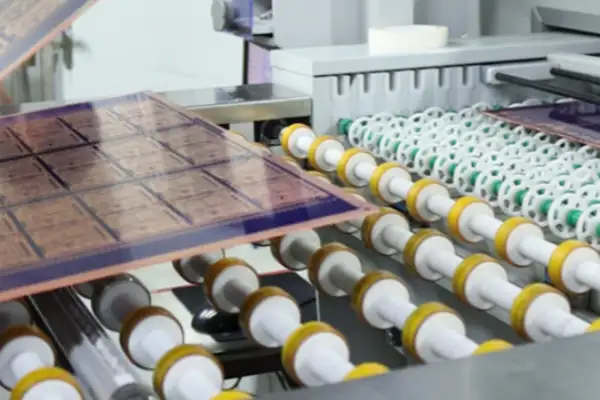
Regarding size control, I tend to be slightly more lenient, for example, making the markings in critical areas slightly larger than the usual recommendations, provided it doesn’t affect the layout. I’ve found that this significantly improves the stability and speed of machine recognition, especially when the equipment is running continuously on the production line and getting hot.
Another easily overlooked point is the placement of these markings. Many people habitually place them at the four corners of the board, but sometimes adjusting the position based on the board’s shape and the distribution of major components can yield better results. For example, on a long, narrow board, adding an auxiliary marking in the middle of the long side.
Ultimately, paying attention to these details isn’t just about passing inspections, but about truly taking responsibility for your product design. After all, nobody wants an entire batch of boards to be reworked or even scrapped because of a few small copper points.
I recently encountered a rather interesting situation while debugging a Fiducial PCB. Several reference points on that board were designed to be very small and irregularly shaped, resulting in slight deviations during pick-and-place machine recognition.
Initially, I thought it was a problem with the equipment calibration, and adjusting the parameters several times didn’t improve the situation. Upon closer inspection, the problem lay in the geometric features of the reference points—they were designed in a cross shape and their dimensions were inconsistent.
This reminded me of an industrial control board I handled previously, where the positioning marks were exceptionally well-defined. Each mark was a standard circle, uniform in size, and with a clean surface finish. The placement machine could quickly identify them with almost no additional adjustments.
Many people easily overlook a detail: the role of reference points is not simply to show the machine a rough position. They need to provide sufficiently clear geometric features to help the vision system establish an accurate coordinate reference system. If the outline of the mark itself is unclear or its shape is complex, even the most advanced equipment will struggle to guarantee placement accuracy.
I once encountered a particularly typical case: a circuit board had its positioning marks made into triangles to save space. As a result, under different lighting conditions, the center point identified by the equipment would fluctuate by several micrometers each time.
From practical experience, the most reliable are still those simple and clear circular marks. They do not produce recognition errors due to changes in rotation angle, and the circular outline is also the easiest to accurately detect edges.
I believe that PCB design shouldn’t be overly focused on novelty, especially in fundamental areas like this. Stable geometry is often more important than fancy shapes; after all, production line equipment prioritizes reliability over creativity.
Sometimes, I see designs with overly complex markings for aesthetic purposes, which ironically creates problems for later production. Simple, neat circular markings are easier to process and identify – why not?
I’ve seen too many engineers stumble with fiducial PCB design. They always think that adding more reference points is always better, but this only causes chaos in the pick-and-place machine’s recognition system.
I remember last year a client insisted on adding markings to all four corners of the board, resulting in frequent errors on the production line. We later discovered that when the vision system simultaneously captured four reference points, it repeatedly calculated the positional deviations of different combinations, actually increasing calibration time. This wasn’t a matter of quantity, but a problem with the layout logic.
The deformation of a PCB during reflow soldering is more complex than you might imagine. The board doesn’t expand and contract flatly with temperature changes; instead, it warps irregularly, like damp cardboard. At this point, three strategically placed reference points can construct a sufficiently accurate compensation model—one in the top left corner, one in the bottom right corner, and one at the midpoint of the opposite long side.
The real key lies in understanding the impact of thermal stress on the board material. FR-4 material exhibits anisotropic deformation at high temperatures, with shrinkage rates along the fiber direction and parallel directions differing by several times. I habitually leave test points during board assembly to observe micron-level deformation after passing through different temperature zones using a microscope.
A recent medical device project left a deep impression on me. They reserved a 0.8mm processing edge on the board edge but placed the reference point only 2mm from the edge. As a result, vibration during board separation caused the markings to slightly detach, necessitating rework of the entire batch.
In fact, the best compensation strategy comes from understanding the entire production process. For example, knowing that the board has already undergone a high-temperature shock during the second side mounting, one should anticipate approximately 0.1% permanent shrinkage.
During a visit to an automotive electronics factory, I noticed an interesting practice: they placed two sets of reference points of different sizes in each unit of the panel; the larger ones were used for coarse positioning, and the smaller ones for fine calibration.
Ultimately, Fiducial design tests one’s insight into manufacturing processes rather than theoretical calculations. Just as a good chef adds salt by feel, an excellent engineer should be able to anticipate every moment the board will deform on the production line.
Those who obsess over having more markers may be overlooking the essence—these three small dots embody the visual logic of the entire automated production line.
I firmly believe that the most elegant designs often emerge under constraints.
When you truly understand how machine vision works, you’ll find that sometimes less is more.
I recently encountered a rather interesting situation. A customer sent us a batch of Fiducial PCB samples to test their placement accuracy, but the machine alarmed within five minutes of being installed—it simply couldn’t recognize the so-called reference points. Upon closer inspection, we discovered that the designers had placed the markings on the silkscreen layer and used a non-standard cross-shaped pattern. This reminds me of a case I helped a medical device manufacturer last year. During mass production, they consistently experienced micron-level placement misalignments, resulting in a 30% rework rate. The investigation revealed that insufficient clearance zones around the reference points caused millimeter-level errors in optical recognition during board bending.
Many people easily overlook the fact that reference points are essentially visual anchor points. Automated equipment relies on them to establish a coordinate system, much like laying the foundation for a house. However, in reality, many engineers focus entirely on circuit routing, only adding a few dots at the last minute to pass inspection. Once, I disassembled the motherboard of a certain brand of robotic vacuum cleaner and discovered they were even using through-holes as reference points—resulting in the suction nozzle constantly hitting the protruding hole rings during mass production, causing irreversible misalignment of the entire batch of BGA chips.
Some design software now generates reference points by default, which actually introduces new problems. I’ve seen people directly use a four-point symmetrical layout scheme automatically generated by software, resulting in the pick-and-place machine misjudging the board orientation due to the high symmetry. Even more insidious is the impact of solder resist thickness: a drone manufacturer once experienced a 0.02mm fluctuation in the thickness of its green solder resist, resulting in -shaped spikes in the solder paste printing. They later switched to matte black ink and added individual local reference points to each unit during panelization, improving the yield rate from 67% to 98%.
Ultimately, good reference point design should be as natural as breathing—you won’t consciously notice it, but its absence can cause major problems. I habitually spend half an hour after completing the layout checking these markings: Are there any defects in the copper foil exposure? Is the solder resist opening two sizes larger than the marking? Are adjacent components kept at least 3mm apart? These details may seem trivial, but they can prevent catastrophic collective misalignment during high-speed placement.
Recently, while testing a flexible circuit board, a new situation was discovered: due to the expansion and contraction of the substrate, the traditional three-point layout can actually cause cumulative errors. We ultimately placed five sets of reference points of different sizes along the diagonal of the board, allowing the machine to automatically compensate for material deformation. This case made me realize that, when facing emerging foldable screen devices or wearable electronics, we may need to rethink the benchmark standards we’ve been using for twenty years.
I recently discovered a rather interesting phenomenon while debugging the production line: even though the reference points on the Fiducial PCB are clearly visible, the equipment seems to play hide-and-seek with micrometer-level precision. This subtle deviation is like a ghost on the circuit board—you clearly see it in its place, reach out to grab it, and it just floats away. Once, we investigated for three days before discovering that the conflict between the thermal expansion coefficient of the substrate and the shrinkage rate of the solder mask caused the actual position of the reference point to drift by half a pixel compared to the design coordinates.
A veteran worker in the workshop has a vivid analogy: you set your navigation destination on a road sign, and the road sign moves on its own. We’ve encountered even more absurd situations—a batch of boards had burrs on the edge of the reference point; machine vision identified it as two center points, and the coordinates fluctuated within ±0.05mm each time. This kind of error is the most frustrating because it looks like a random event, but it’s actually caused by material and manufacturing processes.
Many engineers now like to blame the problem on equipment calibration, but the truth often lies in the details. For example, there’s a kind of latent interference from test points with similar reflective properties; when they are distributed around the reference point, they are like multiple reflections in a mirror maze. I once used a high-magnification magnifying glass to inspect each layer and discovered a 0.2mm test point hidden beneath the solder mask. Its metallic sheen interfered with the camera’s judgment of the reference point’s outline.
Even more alarming is that the deformation of certain boards before and after reflow soldering can alter the spatial relationship of the reference points. We conducted a comparative experiment: the reference point spacing on the same board before placement was a standard 50.000mm, but after passing through the high-temperature zone, it became 50.017mm. This change is enough to cause 0402 components to deviate from their pads. Therefore, we now specifically preheat the board to its operating temperature before re-measuring the coordinate system during first-piece verification.
In fact, solving these kinds of problems requires stepping outside the framework of technical documents. Once, while accompanying a board manufacturer engineer to inspect etching lines, I realized that the accuracy of the reference points begins to accumulate errors from the exposure stage. They now use lasers to create micro-dimples on the board as auxiliary positioning points; these physical anchors are more stable than copper foil patterns. Of course, this method is not suitable for cost-sensitive projects, but it at least reminds us to view accuracy issues from a systemic perspective.
Ultimately, no matter how advanced machine vision is, it cannot bypass the rules of the physical world. Just like a doctor can’t diagnose a patient solely by looking at lab reports, but also by palpation and experience, those hidden errors in light reflection and material stress often require physically examining the board to find clues.
I’ve seen too many production line shutdowns caused by fiducial PCB design issues. Sometimes, a small mishandled reference point requires reworking the entire batch.
I remember once a supplier delivered a board with over-etched edges; the supposedly rounded reference points looked like they’d been chewed by a dog. The pick-and-place machine’s camera kept adjusting its focus, unable to pinpoint the location.
Many people don’t realize that the copper layer beneath the reference points is also crucial. I had a prototype board where the inner copper layer was too close to the reference points, causing slight deformation under high temperatures, resulting in all the component placement coordinates being off.
The most troublesome thing is that these problems often don’t surface immediately. The first few batches might be fine, but a batch with a significant temperature change might suddenly experience problems.
Now, when inspecting PCBs, I always use a magnifying glass to carefully check the smoothness of each reference point’s edge. Sometimes, what looks fine to the naked eye becomes visible under high magnification due to uneven etching and burrs. These details often determine the yield rate of the entire production line.
A truly reliable Fiducial PCB design should consider various variables in the production environment. It shouldn’t just focus on performance at room temperature but also simulate extreme conditions the production line might encounter.
An engineer once told me that changing the shape of the reference points from circles to crosses improved recognition stability. This made me realize that sometimes thinking outside the box can solve old problems.
Ultimately, these seemingly simple positioning marks affect the precision of the entire manufacturing system. They are like tiny gears in precision machinery; individually insignificant, but if they malfunction, the entire system will malfunction.
I’ve seen too many people oversimplify Fiducial PCB design. They think just placing a few marks is enough, resulting in all sorts of problems during component placement.
In fact, the role of reference points is much more subtle than many people imagine. Once, while inspecting a board, I found that the engineer had placed four local reference points around the BGA, but the spacing was incorrect, causing interference during machine recognition. This made me realize that quantity isn’t always better; the key is for the vision system to clearly distinguish the role of each reference point.
Speaking of silkscreen printing, many people treat it as a panacea. I’ve seen people directly draw positioning frames on the silkscreen layer, resulting in entire batches of boards being scrapped during mass production due to alignment errors. The precision of silkscreen printing simply doesn’t meet positioning requirements; its role should be to assist in recognition, not precise coordinate positioning.
The issue of contrast is often overlooked. One board used dark solder resist ink paired with ordinary copper reference points, making it almost unreadable under specific lighting conditions in the workshop. Later, we changed it to a matte finish for the reference point areas, and the effect was immediate.
The arrangement of local reference points needs to be considered in conjunction with component density. High-density areas are best handled with a triangular layout rather than simple symmetrical placement, as this provides the vision system with a more three-dimensional reference frame.
The most easily overlooked issue is the spacing between reference points and pads. Pick-and-place machines have a safety distance requirement during recognition; too close a distance can affect the final placement position of components.
Another crucial point: different PCB materials have different coefficients of thermal deformation, which directly affects the actual effectiveness of global reference points. Sometimes, adding one or two auxiliary reference points is more reliable than relying entirely on global markers.
Ultimately, a good reference point design should act like an invisible guide, ensuring accuracy without disrupting normal production processes. This requires comprehensive consideration of machine vision characteristics and various variables in the actual production environment.
I recommend performing a virtual inspection using actual equipment in the factory after each design is completed. Many problems only become apparent during simulation.
Remember this principle: reference points are for machines, not humans. Sometimes what we consider a clear design may appear very different to the machine.
With experience, you’ll find that the best designs are often those that consider all possible anomalies. After all, the actual situation on a production line is always far more complex than theory.
Next time you design, ask yourself: If a reference point temporarily fails, what is my backup plan? This thought process itself can uncover many potential problems.
Ultimately, the design quality of a Fiducial PCB directly determines the smoothness of subsequent production, making it worthwhile to invest sufficient time in refining every detail.
I’ve seen too many engineers stumble on Fiducial PCB design. They always think the reference points are just for show and can be placed anywhere, only to discover the serious problems during placement. Once, I encountered a board where the components near the edges were perfectly aligned, but the chips in the center were all crooked by half a millimeter. This error wasn’t a machine problem, but rather a failure to consider the placement logic of the reference points during the design phase.
You think simply throwing three points in the corners of the board is enough? In reality, the position of the reference points directly affects the overall placement accuracy. The greater the distance, the more pronounced the error becomes—like using a long lever to pry something; even a slight movement at the end will cause a large shift at the front. I usually add a reference point in the center area of the board so that the machine can better compensate for the deformation of the entire plane during calibration.
Environmental factors are often overlooked. Temperature changes cause the board to expand and contract, and humidity affects the reflectivity of the ink; all of these can cause deviations when the machine recognizes the reference points. I remember a batch of boards that produced without problems in the dry winter, but the pick-and-place machine kept reporting errors during the rainy season. It turned out the contrast of the reference points had changed due to the humidity, causing a fluctuation of a few micrometers in the machine’s coordinate recognition.
Component density is also a key factor. The fine-pitch BGA chips on high-density boards are particularly sensitive to positioning. Sometimes the reference points themselves are fine, but the board deforms due to heat during reflow soldering, causing components to shift along with it. In such cases, three reference points alone are insufficient; I usually set local calibration points around the main chips.
The most troublesome are those intermittent failures. Some boards from the same batch are perfectly mounted, while others are misaligned. This ghostly error is often due to insufficient consistency in reference point processing. Differences in laser engraving depth, ink thickness, and even batch variations in reflective materials can all cause random errors in the machine’s coordinate recognition.
Now, when designing, I deliberately make the reference points asymmetrically arranged so the machine can recognize the board’s orientation and avoid 180-degree rotation errors. Furthermore, large boards must be marked with panelization markers; otherwise, the coordinate system of each smaller board will be incorrect after separation. These details may seem insignificant, but they often determine the overall yield rate of production.
In fact, there is no standard answer to these problems; each board has its own characteristics. The key is to understand that reference points are not isolated markers, but anchor points for the entire positioning system. They are closely related to component layout, board characteristics, and manufacturing processes. Only by considering all these factors can placement errors be fundamentally reduced.
Sometimes the simplest solution is the most effective. For example, appropriately increasing the size of the reference points to improve contrast or avoiding areas of the board prone to deformation. These adjustments do not require advanced technology, but their impact on actual production is immediate.
PCB design is like playing chess; every move must consider the possibilities ten moves ahead. Reference points may seem like just a few pieces on the chessboard, but they determine the course of the entire game.
Many engineers focus too much on technical parameters early on and overlook
As someone who has worked in PCB outsourcing for years, I’ve found
Cramming a camera, amplifier, dual-mic array, and Wi-Fi radio into a palm-sized
- Expert en production de petites et moyennes séries
- Fabrication de circuits imprimés de haute précision et assemblage automatisé
- Partenaire fiable pour les projets électroniques OEM/ODM
Heures d'ouverture : (Lun-Sam) De 9:00 à 18:30
Get quote, solution or any question, Andre always here to help